
Philippines hiring guide
Filipino virtual assistant: A practical hiring guide for 2026
A Filipino virtual assistant can take on repeat work when the role has clear limits, examples, and a manager. This guide shows how to choose tasks, screen candidates, protect access, and run a careful controlled launch.
Short answer
A Filipino virtual assistant is a Philippines-based remote worker who handles defined business tasks such as inbox support, records, scheduling, research, and routine follow-up. The hire works best when you start with one clear queue, show what good work looks like, and keep judgment calls with a named manager.
What to settle first
- Choose one repeat task before writing a broad job description.
- Use the same work sample and scorecard for each candidate.
- Plan a controlled launch with small batches and regular review.
- Give limited access, use MFA, and write down the offboarding steps.
- Hire and provide talent only from the Philippines for this model.
Start with the result you need
Do not begin with a title like "rockstar VA" or a long list of unrelated chores. Use a staffing plan to name the result instead, such as clearing routine order questions by 3 p.m. or preparing a clean sales report every Friday.
Pick work that repeats, has a clear finish, and can be checked against a real example. Inbox sorting, CRM cleanup, calendar preparation, customer follow-up, and weekly report work are often easier first lanes than open-ended project ownership.
Separate task work from owner decisions
A Filipino virtual assistant can prepare a refund case, but the business owner should set the refund limit and approve exceptions. Use provider questions to confirm who handles daily review. The assistant can draft a supplier reply, while a manager keeps final control of contract terms, policy changes, and sensitive HR calls.
Write a short stop list beside each task so the worker knows when to pause. Include cases involving money, legal threats, account ownership, unusual customer demands, or any request that falls outside the approved examples.
Build a role brief candidates can use
A useful brief names the task lanes, tools, work hours, time zone, expected output, and person who reviews the work. It also says which decisions stay with the client and which systems the worker may use during the launch period.
The Philippines uses Philippine Standard Time, which PAGASA lists as UTC+8. Show both the worker schedule and the manager overlap in that time zone so candidates can judge the shift before the interview.
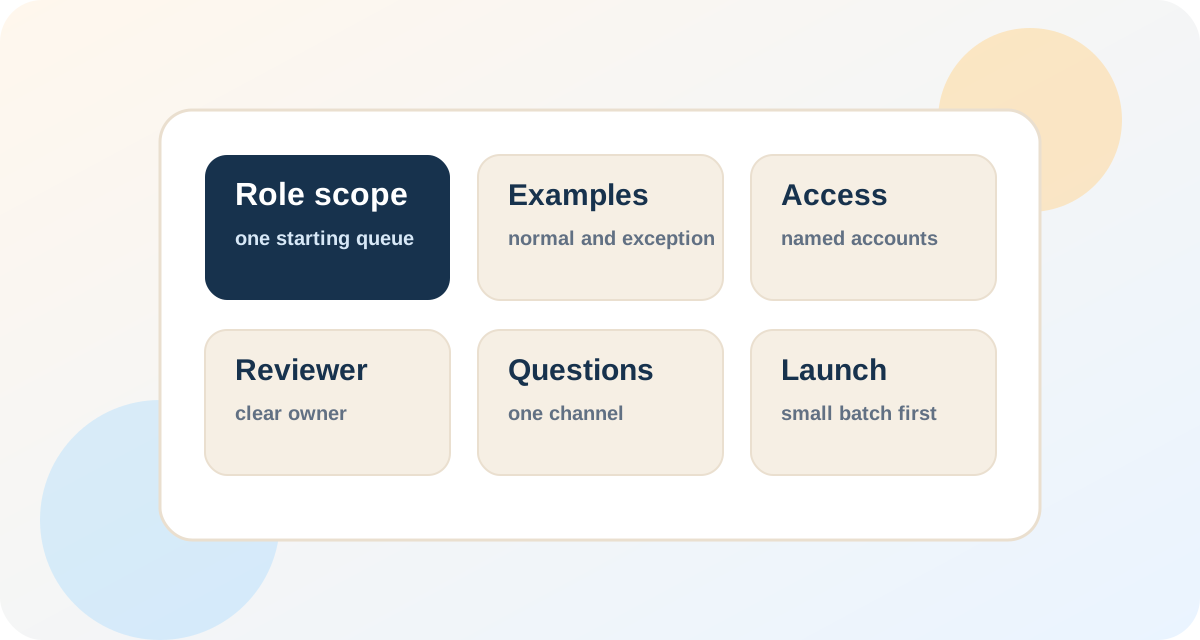
Name one queue
Choose one weekly or daily queue with a clear finish. Attach 3 to 5 redacted examples that show normal work and one exception.
Set the limits
List the actions the assistant may take without asking. Put payment, policy, access, and unusual customer decisions on the manager list.
Set the schedule
Write the hours in Philippine Standard Time and the client time zone. Add a 30 to 60 minute overlap when live questions matter.
Name the reviewer
Choose one person who can answer questions and check early work. Reserve a short review block during the launch period.
Screen with the work, not polished claims
Use a short interview to confirm communication, schedule, and relevant experience, then move to a small work sample. Give every candidate the same instructions, time limit, source files, and scorecard so you can compare the work fairly.
Score accuracy first because a fast wrong answer creates more work. Then check whether the candidate followed the steps, wrote clearly, spotted an exception, and asked for help at the right point.
Compare direct hiring and managed staffing
A direct hire gives you a close working relationship, but your company handles sourcing, screening, pay, management, leave coverage, and replacement. A staffing provider may handle part of that work, so ask for the exact owner of each step before comparing a quote.
Do not assume the word "managed" includes daily quality review or backup coverage. Ask who checks attendance, who corrects weak work, what happens during an outage, and how quickly the provider starts a replacement process.
Protect accounts before the first login
Start with the fewest permissions needed for the first task lane. NIST places identity and access control inside cyber risk management, and Microsoft describes least privilege as giving users only the access needed to do their work.
Use named accounts, CISA multifactor authentication guidance, and a password manager rather than shared passwords in chat. CISA recommends MFA because a stolen password alone should not be enough to reach an account.
Keep a simple access list with the system, permission level, account owner, approval date, and removal step. Review it during the launch period, after any role change, and on the same day the working relationship ends.
Run a controlled launch in small stages
Start by training on one task and reviewing completed items closely. Then use a small live batch and record each question or exception in the written process.
Increase volume only when the first lane stays accurate. At the review point, check work samples, errors, response time, attendance, access, and the manager time still needed before adding another task.
Learn with examples
Walk through one correct item and one exception. Let the assistant complete a small sample while the reviewer stays available.
Use a small live batch
Move a limited set of real work into the queue. Review it regularly and update the instructions where questions repeat.
Hold a steady lane
Keep the same task long enough to see a pattern. Add volume before adding a second kind of work.
Make a clear call
Keep, change, or stop the lane based on samples and simple measures. Remove access that the role no longer needs.
Manage the work without filling the day with calls
Use one written queue, one place for questions, and one short review time. A daily update can list finished work, blocked items, decisions needed, and the first task for tomorrow without turning into a long meeting.
Review the work on screen instead of asking whether everything is fine. Open two completed items and one difficult case, then give a written correction that the assistant can use the next time the same issue appears.
Review the plan before publishing the role
Before a staffing request goes out, read the plan as if you were the person doing the work. The plan should answer what starts first, what a finished item looks like, which systems are allowed, and which decisions require a manager. If those answers are scattered, the role is not ready for candidate review.
Ask one manager who is not involved in the project to read the brief and explain the role back in plain language. Confusion during that review is useful because it finds gaps before the worker receives live tasks. Update the examples and stop rules while the role is still easy to adjust.
A final review also keeps the article useful for later hiring. The same role brief can support replacement, backup coverage, or a second hire because the business has already written down the operating standard.
A sample first-month planning board
The figures below are planning examples, not promised results or fixed service levels. Change them to match the risk, volume, and manager time in your own role.
starting task lane
Keep the first handoff narrow enough to inspect closely.
sample items
Use normal examples plus at least one case that needs escalation.
daily review block
Reserve manager time while questions are still easy to fix.
role checkpoint
Decide whether to keep, change, or stop the initial lane.
These numbers form a cautious example for a low-risk admin or support queue. A role involving money, health data, legal work, or broad system access may need slower steps and more review.
Questions that expose a weak hiring plan
Script for the provider call
"I want to start with one task lane: [name the queue]. Please explain how you would test candidates, who checks work in launch period, and what happens if the first hire is absent or not a fit."
Replace the bracketed text with a real queue before the call. Ask the provider to answer with names, steps, and time frames rather than a broad promise.
Script for an access boundary
"You may prepare the refund record and draft the reply. Stop and tag [manager name] when the amount is above [limit], the customer threatens legal action, or the request falls outside these examples."
This is a planning example, not legal advice. Set the limit and exception list with the person who owns the policy.
Mini-scenario: handing off an order inbox
A small online store receives about 40 routine order messages on a busy day, but the owner still handles refunds and policy exceptions. The first handoff is limited to tagging new messages, answering approved order-status questions, and preparing difficult cases for review.
The owner shares 5 redacted examples, a reply library, and a stop list before day 1. At launch, the assistant drafts replies without sending them, and the owner reviews a small sample at the end of the shift.
After the sample is accurate, the assistant sends routine replies and leaves refunds in a manager queue. At the review point, the owner checks reopened tickets, incorrect tags, response time, and real conversations before deciding whether to add return-status work.
Questions buyers ask
Q: What tasks can a Filipino virtual assistant handle?
A: Good first tasks include inbox sorting, routine customer replies, calendar preparation, record cleanup, research, CRM updates, and weekly reports. Start with work that repeats, has a clear finish, and can be checked against an example.
Q: Should I hire directly or use a staffing provider?
A: Direct hiring may give you more control, while a provider may help with sourcing, screening, pay, management, or replacement. Compare the exact work included, the person responsible for each step, and the manager time your team must still provide.
Q: How long should onboarding take?
A: A low-risk task can start with a training sample followed by a small live batch. Treat the first formal review as a control point rather than a promise that every role will be fully independent by then.
Q: How do I protect customer and company data?
A: Give only the access needed, use named accounts and MFA, and keep passwords in an approved password manager. Record how access is approved, reviewed, and removed, then get legal or security advice when the work involves regulated data.
Q: What should I measure in the first month?
A: Check real work samples for accuracy, missed steps, repeated questions, and cases that should have been escalated. Add simple measures such as response time or completed items only when they match the task and do not reward rushed work.